


If your website is getting visitors but nobody is booking, calling, or reaching out, the problem is almost always the same thing. There is no clear, compelling prompt telling them what to do next. In marketing this is called a call to action. But you don’t need to know the term to fix it. You just need to know what it is, where it goes, and how to write one that actually works.
This post is part of a series expanding on the Small Business Website Checklist: 9 Things Your Site Needs to Get Clients; point two on that list is one single, strong call to action, and this post goes deep on exactly that. We’ll cover, what a call to action (CTA) actually is, why having too many CTAs hurts you, and call to action examples for websites.
What Is a Call to Action on a Website?
A call to action, commonly shortened to CTA, is any button, link, or prompt on your website that tells a visitor what to do next. It’s the thing you want them to click. It could be a button that says “Pitch Your Project,” a link that says “Let’s Fix My Website,” or a prompt that says “Claim My Free Website Audit.”

Every page on your website should have at least one. Without it, visitors arrive, look around, and leave, not because they weren’t interested, but because nothing clearly told them what the next step was. A call to action is essentially a signpost. It removes the guesswork and guides your visitor toward the one action that moves them closer to becoming a client.
It is not your logo. It is not your navigation menu. It is not a paragraph of text. It is a specific, visible, clickable prompt that tells your visitor exactly what to do and makes doing it easy.
Why Your Website Needs One Single Strong Call to Action
Here is where most small business websites go wrong, not from having no call to action, but from having too many. Five buttons asking visitors to do five different things simultaneously. Book a call. Download a guide. Follow on Instagram. Browse listings. Read the blog. Each one is competing with the others for the visitor’s attention.
The result is decision paralysis. When the human brain is presented with too many options at once, it defaults to the easiest decision available, which is no decision at all. Your visitor closes the tab and moves on without taking any action, not because they weren’t interested but because you made the decision too complicated.
One page should have one primary goal. That doesn’t mean you can’t have secondary links or navigation, it means that one action should be visually dominant, clearly worded, and impossible to miss. Everything else on the page should support that one goal rather than compete with it.
This is especially important on your homepage, which is where most of your cold traffic lands first. A homepage with one clear, confident CTA tells your visitor exactly where you want them to go next. A homepage with six competing buttons tells them you’re not sure what you want either, and that uncertainty transfers directly to them.
What Makes a Strong Website Call to Action
A strong call to action has three components working together: the wording, the placement, and the visibility. Miss any one of these and even a well-intentioned CTA will underperform.
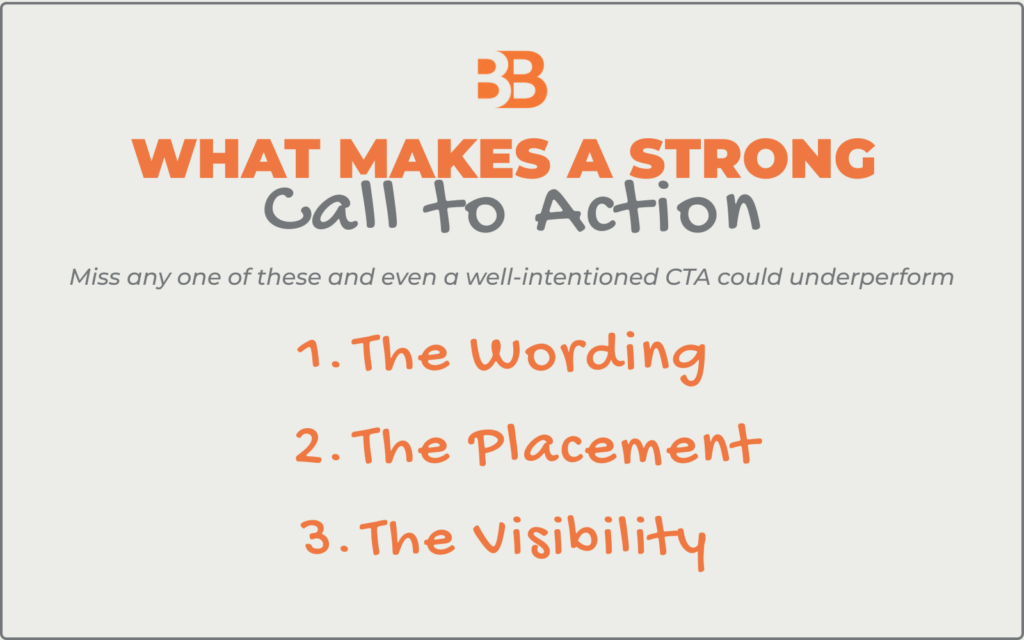
THE WORDING is where most small business websites lose people. Generic button copy like “Submit,” “Click Here,” or “Learn More” tells the visitor nothing about what happens when they click. Strong CTA copy is specific, action oriented, and outcome focused. It tells the visitor exactly what they’re getting by clicking, not just what they’re doing.
THE PLACEMENT determines whether your CTA gets seen at all. Your primary CTA should appear in three places on your homepage, in your top navigation, in the center of your hero section where it’s the first thing a visitor sees, and at least once more as they scroll down the page. Burying your CTA at the bottom of a long page means the majority of your visitors never see it.
THE VISIBILITY is about making your CTA button stand out visually from everything else on the page. It should be a different colour from your background and your text, ideally your strongest brand colour, and large enough to tap comfortably on a mobile screen. If your CTA button blends into the page design, visitors will scroll right past it without registering that it’s there.
Call to Action Examples for Websites: The Strong, The Weak, and The Fix
Let’s look at how this plays out in practice using real estate agents as the example, an industry where calls to action are frequently either too vague, too pushy, or buried where nobody can find them.
CTA Example # 1
Weak Call to Action: “Submit”
- This is the default button text that appears when someone sets up a contact form and never changes it.
- It tells the visitor nothing about what happens after they click, what they’re submitting, or what they’ll receive in return.
- It feels cold, transactional, and uninviting, which is the opposite of how you want a potential buyer or seller to feel when they’re about to trust you with one of the biggest financial decisions of their life.
Strong Call to Action: “Book Your Free Home Buying Consultation”
- This version tells the visitor exactly what they’re getting, a consultation, it’s free, and it’s specifically about buying a home. Every word is doing a job.
- The specificity removes uncertainty, the word “free” removes financial hesitation, and “home buying” confirms they’re in the right place.
CTA Example # 2
Weak Call to Action: “Learn More”
- Learn more about what? This button appears on countless real estate websites beneath property listings, agent bios, and service descriptions, and it means nothing in any of those contexts.
- It’s a placeholder that was never replaced with something meaningful.
- A visitor reading “learn more” has no idea what they’re clicking toward or whether it’s worth their time.
Strong Call to Action: “See All Available Listings in [Your City]”
- This version is specific to the action, specific to the location, and speaks directly to what a home buyer actually wants to do.
- It answers the visitor’s unspoken question: what will I find when I click this? Before they even have to ask it.
CTA Example # 3
Weak Call to Action: “Contact Us”
- Generic, passive, and gives the visitor no reason to act now rather than later.
- “Contact us” puts all the effort on the visitor, they have to decide to reach out, figure out what to say, and motivate themselves to do it.
- Most won’t bother, especially if they’re early in their search and not yet ready to commit to a conversation.
Strong Call to Action: “Get Your Free Home Valuation Today”
- This version leads with the value the visitor receives, a free home valuation, rather than the action you want them to take.
- It also includes the word “today” which creates a gentle sense of immediacy without being pushy.
- A homeowner considering selling reads this and immediately understands the specific benefit of clicking. That clarity is what drives action.
How to Write a Call to Action (Step by Step)
Writing a strong call to action doesn’t require marketing expertise. It requires answering two questions clearly and combining them into a short, confident phrase.
Question #1 – what do you want the visitor to do? Be specific. Not “contact you” but “book a call,” “request a quote,” “schedule a viewing,” or “get a valuation.” Name the exact action as precisely as possible.
Question # 2 – what does the visitor get by doing it? This is the value exchange: what’s in it for them. Is it free? Is it fast? Is it specific to their situation? The more clearly you name the benefit, the more confident a visitor feels clicking.
Put those two answers together and you have the foundation of a strong CTA every time.
The Strong CTA Formula
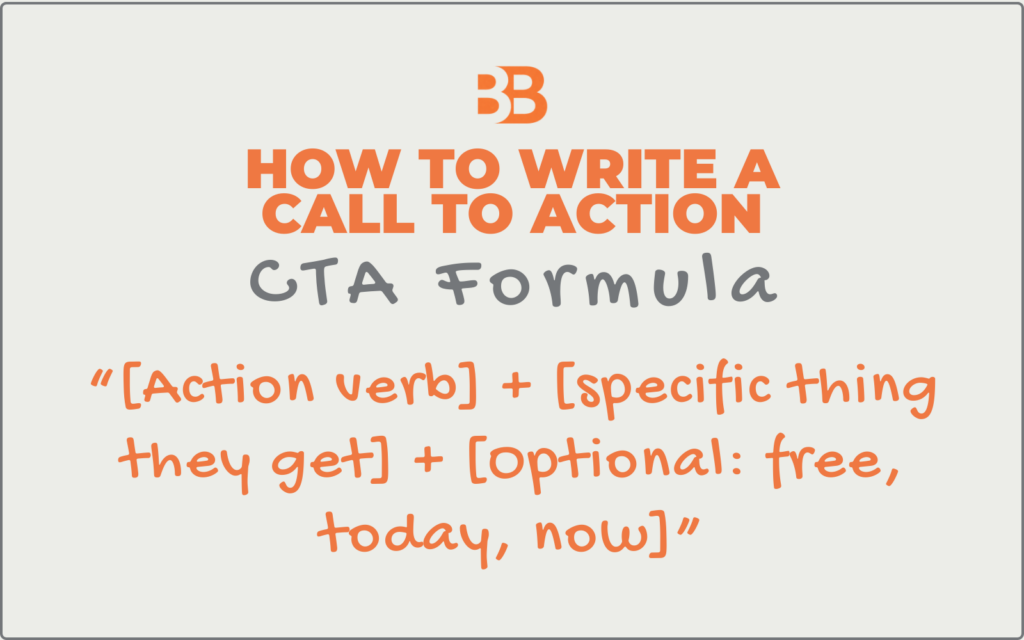
“[Action verb] + [specific thing they get] + [optional: free, today, now]”
For example: “Book Your Free Strategy Call Today”. The action verb is Book, specific thing is Strategy Call, and free plus today add value and urgency without pressure.
Write three versions before you commit to one. Read each out loud and ask yourself, does this tell my ideal client exactly what they’re getting and make it easy to say yes? If the answer is yes, you have your CTA.
Common Call to Action Mistakes to Avoid
Even with the formula in hand, there are several traps worth knowing about before you go and update your website.
Having too many CTAs competing for attention. As we covered earlier, more options create more paralysis. Pick one primary CTA per page and let everything else support it rather than compete with it.
Using the same CTA on every page regardless of context. Your homepage CTA and your blog post CTA should not be identical, because the visitor’s intent on each page is different. Someone reading a blog post is in learning mode — a softer CTA like “Download the Free Checklist” fits better there than “Book a Call Now.”
Burying your CTA below the fold. Below the fold means below the point where a visitor has to scroll to see it. A significant portion of your visitors never scroll — if your CTA isn’t visible without scrolling, a large chunk of your traffic never sees it at all.
Ignoring mobile. Your CTA button needs to be large enough to tap comfortably with a thumb on a phone screen. If it’s too small, too close to other elements, or disappears on mobile, you’re losing the majority of your traffic before they ever get a chance to click.
Vague action verbs. Words like “explore,” “discover,” and “learn” are weak because they describe passive activities rather than decisive actions. Strong CTAs use confident, specific verbs, book, get, schedule, request, claim, start.
Overall Thoughts and Suggestions on Call to Actions for Websites
Your call to action is the bridge between a visitor who’s interested and a client who’s ready to move forward. Every other element on your website: your headline, your photos, your testimonials, exists to build enough trust and interest that when a visitor reaches your CTA, clicking it feels like the obvious and natural next step.
If you went through this post and realised your current CTAs need work, here are three simple steps to start with today:
Step 1: Audit every button on your homepage. Go through your homepage right now and write down every button and clickable prompt you have. Count how many there are and read the copy on each one. If any of them say “Submit,” “Learn More,” “Click Here,” or “Contact Us”, those are your first fixes.
Step 2: Rewrite your primary CTA using the formula. Take your most important button, the one on your hero section, and rewrite it using the formula above. Action verb, specific thing they get, and an optional urgency word. Compare the old version and the new version side by side and notice how different they feel.
Step 3: Check your CTA on mobile. Pull out your phone, go to your homepage, and try to tap your CTA button with your thumb. Is it easy to find? Easy to tap? Does it even appear on mobile? Fix anything that feels even slightly awkward: your mobile visitors are your majority audience and they deserve the same clear experience as desktop visitors.
These three steps take under an hour and could meaningfully change how many visitors turn into actual inquiries from your website.
This post is part of a series working through the full Small Business Website Checklist: 9 Things Your Site Needs to Get Clients. If you haven’t sorted your homepage headline yet, start with [Why Your Website Headline Isn’t Working and How to Get It Right] before coming back to your CTA: the two work together as the most important one-two punch on your entire homepage.


